Superannuation
Superannuation details are recorded against each employee, on the Superannuation tab of their profile.
To get there, open Employees, select View on the employee, then choose the Superannuation tab.
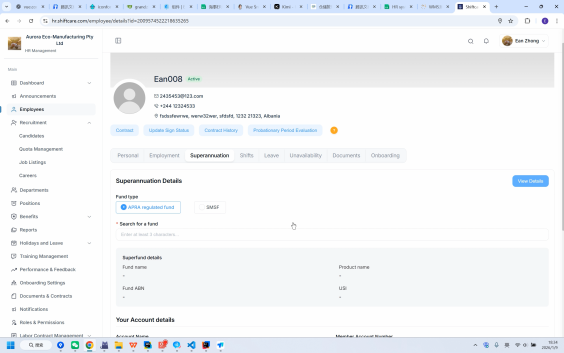
Viewing and editing
The tab opens in view mode. Select Edit Information to make changes, and View Details to return to the read-only view.
Fund type
Choose the Fund type the employee belongs to:
- APRA regulated fund
- SMSF (Self-Managed Super Fund)
The fields that follow depend on which you choose.
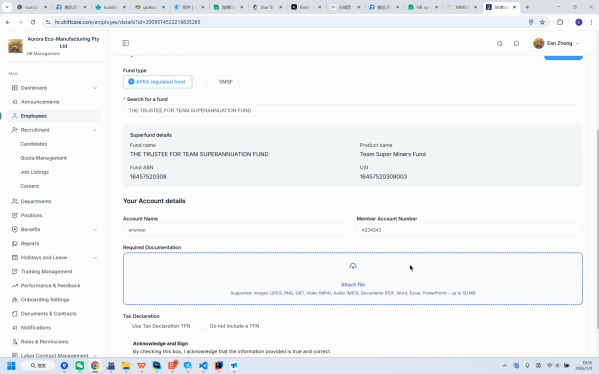
APRA regulated fund
| Field | Description |
|---|---|
| Search for a fund | Start typing the fund name - enter at least 3 characters to search |
| Account Name | The name on the employee's super account |
| Member Account Number | The employee's membership number with the fund |
SMSF
Self-managed funds need the fund's own details, plus its bank account.
SMSF Details
| Field | Description |
|---|---|
| SMSF Name | The name of the fund |
| SMSF ABN | The fund's ABN |
| SMSF electronic service address (ESA) | The fund's ESA for receiving contribution messages |
| Fund contact email | Contact address for the fund |
| Account Name | The name on the account |
| Member Number | The employee's member number |
SMSF Bank Details
| Field | Description |
|---|---|
| Account name | Name on the bank account |
| Account BSB | The BSB |
| Account number | The account number |
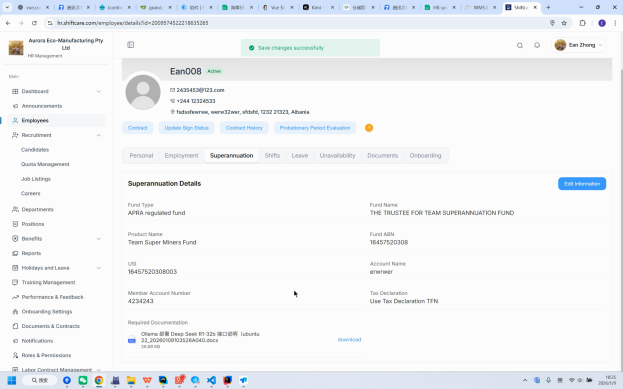
Supporting documents
Two further fields apply to both fund types:
- Required Documentation - upload any supporting paperwork
- Tax Declaration - the employee's tax declaration
tip
For an SMSF, check the ESA and ABN carefully - contributions are rejected if either is wrong.