Dashboard Features
This page describes each element of the dashboard view. For where you land when you sign in, see Dashboard.
Total Employee
Purpose: Monitor your workforce size and growth trends
Functionality:
- Displays the total count of all currently employed staff
- Shows the percentage change against last month
Use Case: Track hiring trends and workforce expansion or contraction patterns.
On Leave
Purpose: Manage and track employee leave requests
Functionality:
- Displays count of employees on approved leave for the current day
- Shows the percentage change against the previous day
Use Case: Plan resource allocation and manage workload distribution.
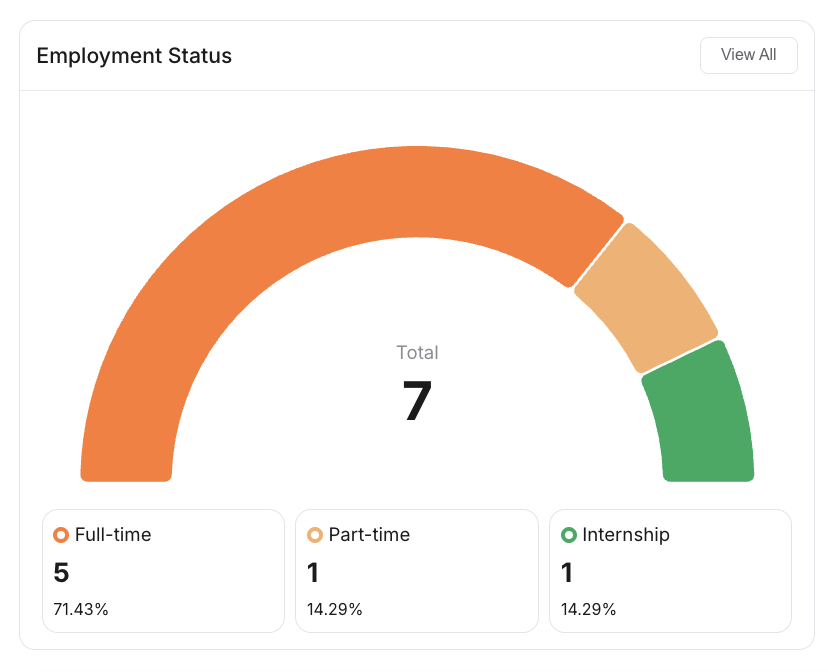
Employment Status
Purpose: Visualize workforce composition by employment type
Functionality:
- Groups employees by employment type
- Shows the distribution as a visual breakdown
- View All opens the employee list
Use Case: Understand workforce structure for planning and compliance purposes.
Departments
Purpose: Analyze workforce distribution across organizational units
Functionality:
- Shows employee count for each department
- View All opens the Departments directory
Use Case: Balance workload across departments and identify staffing needs.
Upcoming Birthday
Purpose: Employee engagement and recognition
Functionality:
- Lists employees with upcoming birthdays
- View All opens the Employee Birthday report
Use Case: Maintain employee engagement through birthday recognition and celebrations.
Announcements
Purpose: Keep up with company news
Functionality:
- Lists recent announcements with a preview of their content
- Select an announcement to open it in full
Use Case: Stay across company updates without leaving the dashboard.
List Employee
Purpose: Quick access to your employee directory
Functionality:
- Lists employees with key details, including full name and employment status (Full-time, Part-time, Internship, Contractor, Casual, or Others)
- View All opens the full Employees page
Use Case: Quick employee lookup and access to detailed employee information.
Tips for Using Dashboard Features
Best Practices
- Review dashboard figures regularly for operational awareness
- Use the month-over-month and day-over-day comparisons to spot changes early
- Use View All to move from a summary straight into the relevant module
Monitoring Recommendations
- Review department numbers monthly
- Monitor leave patterns for resource planning
- Keep employee information updated regularly