My Benefits

The My Benefits module is your personal hub for exploring, applying for, and tracking employee benefits programs offered by your organization. This self-service portal empowers you to take advantage of company perks, wellness programs, and various benefit offerings designed to enhance your employment experience and support your personal and professional growth.

Apply for Benefits

Benefits

The Apply for Benefits section allows you to browse available benefit programs and submit applications for those that meet your needs and eligibility requirements.

How to Apply

  1. Browse Available Benefits: Review the catalog of benefits your company offers
  2. Check Eligibility: Verify that you meet the requirements for specific benefits
  3. Select Benefit: Choose the benefit program you wish to apply for
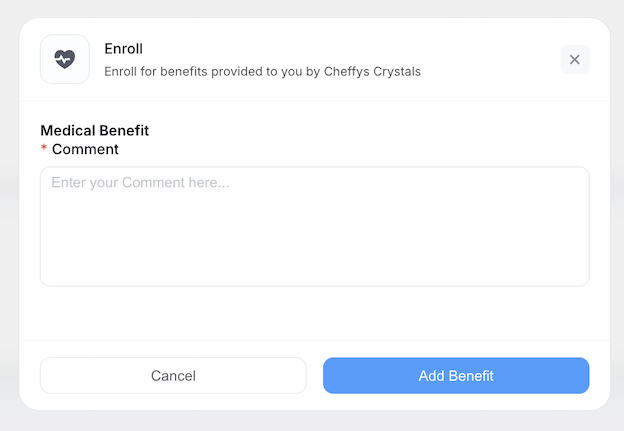
  4. Complete Application: Fill out the required information and supporting details
  5. Submit Request: Click submit to send your application for approval

Application Process

Required Information:

Depending on the benefit type, you may need to provide:

  • Personal information and employee details
  • Reason for requesting the benefit
  • Preferred start date or enrollment period

Supported Benefit Types:

Common benefits you can apply for include:

  • Health & Wellness: Medical insurance, dental coverage, vision care, gym memberships
  • Professional Development: Training courses, certifications, conference attendance, education assistance
  • Financial Benefits: Retirement plans, stock options, employee loans, advance salary
  • Work-Life Balance: Flexible working arrangements, childcare support, commuter benefits
  • Insurance: Life insurance, disability insurance, travel insurance
  • Lifestyle Perks: Employee discounts, wellness programs, recreational activities

File Attachments:

For certain benefits, you may need to upload supporting documents:

  • Medical bills or prescriptions (for health-related benefits)
  • Training course details or enrollment confirmation
  • Receipts for reimbursement requests
  • Certificates of completion (for education benefits)
  • Dependent information documents

Notification System

Upon Successful Submission:

After you successfully submit a benefit application:

  • Confirmation Message: You receive an immediate on-screen confirmation
  • 📧 Internal Notification: An automatic internal message is sent to your HR for review
  • 📱 Application Tracking: Your request appears in your Benefit History with "Pending" status
  • 🔔 Status Updates: You'll receive notifications when your application status changes

Approval Workflow:

Your benefit application follows this typical approval path:

  1. Submitted → Application sent to department leader
  2. Approved → Benefit application has been approved

Alternatively, if not approved:

  • Rejected → Application declined with reason provided

Tips for Successful Applications

  • Read Requirements Carefully: Ensure you meet all eligibility criteria before applying
  • Provide Complete Information: Fill out all required fields accurately to avoid delays
  • Attach Proper Documentation: Include all necessary supporting documents with your application
  • Apply Early: Submit applications well before deadlines, especially for time-sensitive benefits
  • Follow Up: Check your Benefit History regularly for status updates
  • Contact HR: Reach out if you have questions about benefit programs or your application status

Benefit History

The Benefit History section provides a comprehensive record of all benefit applications you've submitted, allowing you to track their progress and maintain documentation of your enrolled benefits.

What You Can View

Your Benefit History displays a complete list of all benefit applications with the following information:

Application Details:

  • Benefit Name: The specific benefit program you applied for
  • Application Date: When you submitted the request
  • Benefit Category: Type of benefit (Health, Financial, Professional Development, etc.)

Review Status:

  • Pending: Application is awaiting review by your manager or HR
  • Approved: Your application has been accepted
  • Rejected: Application was declined

Additional Information:

  • Comments/Reason: Feedback from approver, especially for rejections
  • Amount: Financial value of the benefit (if applicable)
  • Effective Date: When the benefit becomes active
  • Expiry Date: When the benefit ends or needs renewal (if applicable)

Features and Actions

Filtering and Search:

  • Filter by benefit type, status, or date range
  • Search for specific applications by benefit name or application ID
  • Sort by application date, status, or benefit category

View Detailed Information:

  • Click on any benefit application to see complete details
  • Review submitted information and attached documents
  • Check approval workflow and who processed your request
  • View any comments or feedback from approvers

Action Buttons: Available actions may include:

  • View Details: Access full application information
  • Cancel Request: Withdraw pending applications (before approval)

Benefit History Uses

Personal Record Keeping:

  • Maintain documentation of all benefits you've received
  • Track reimbursements and payments
  • Reference past applications when applying for similar benefits
  • Monitor benefit utilization throughout the year

Financial Planning:

  • Review total value of benefits received
  • Plan for upcoming benefit applications
  • Track reimbursement timelines
  • Ensure you're maximizing available benefits

Compliance and Audit:

  • Provide proof of benefit enrollment when needed
  • Verify coverage periods for insurance or health benefits
  • Support tax documentation requirements
  • Respond to audit requests with historical records

Notifications and Alerts

You'll receive automatic notifications about:

  • ✅ Application status changes (approval, rejection, completion)
  • ⏰ Upcoming benefit expiration dates requiring renewal
  • 📋 Required actions (additional documentation needed)

Benefits Management Best Practices

Maximize Your Benefits

  1. Review Available Benefits Regularly: Check for new programs or offerings
  2. Understand Eligibility: Know which benefits you qualify for and any tenure requirements
  3. Track Deadlines: Note enrollment periods and renewal dates
  4. Keep Documentation: Save all benefit-related emails and documents
  5. Use What You Have: Don't let benefits go unused – they're part of your compensation

Plan Ahead

  • Annual Enrollment: Mark your calendar for open enrollment periods
  • Budget Benefits: Plan which benefits to use throughout the year
  • Dependent Coverage: Keep beneficiary information up to date
  • Life Changes: Update benefit selections after major life events (marriage, birth, etc.)

Communication

  • Ask Questions: Contact HR if anything is unclear about benefit programs
  • Provide Feedback: Share your thoughts on benefit offerings during surveys
  • Stay Informed: Read benefit-related announcements and updates
  • Check Regularly: Review your Benefit History periodically to ensure accuracy